> ## Documentation Index
> Fetch the complete documentation index at: https://docs.extractor.live/llms.txt
> Use this file to discover all available pages before exploring further.
# Audit Trail
> Review every user action in your Hacken Extractor organization with the Audit Trail — a tamper-evident log of logins, changes, and configuration updates.
 ## Overview
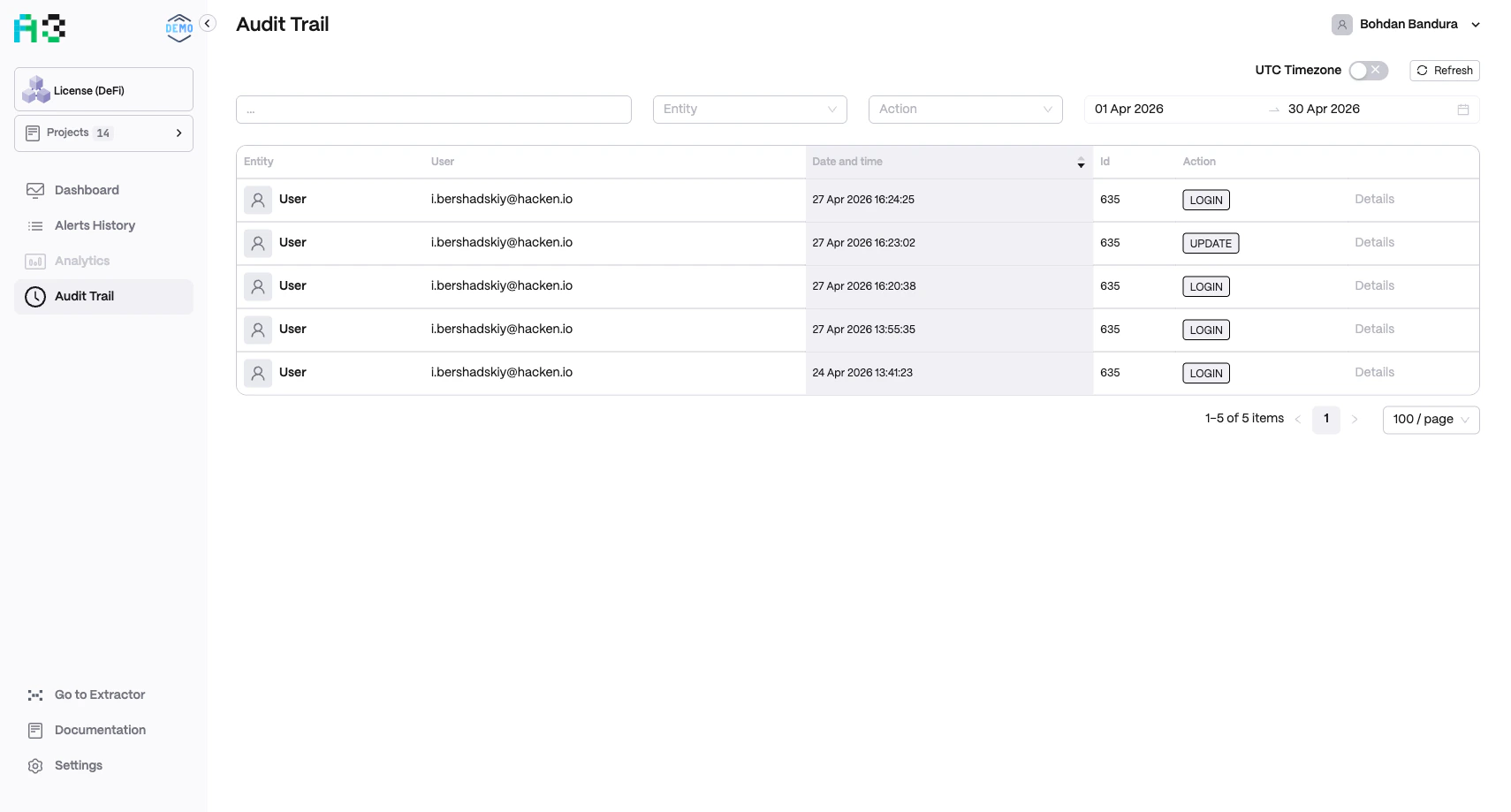
Navigate to **Audit Trail** in the left sidebar. The trail records all significant user actions — logins, configuration updates, and more — with full attribution and timestamps.
Click **Refresh** to reload the latest entries. Toggle **UTC Timezone** in the top-right to display timestamps in UTC or your local timezone.
## Log Table
Each row in the audit log contains:
| Column | Description |
| ----------------- | --------------------------------------------------------------------------- |
| **Entity** | The type of object that was acted upon (e.g. `User`, `Project`, `Contract`) |
| **User** | Email address of the user who performed the action |
| **Date and time** | Exact timestamp of the action |
| **Id** | Internal identifier of the affected entity |
| **Action** | Action type — e.g. `LOGIN`, `UPDATE`, `CREATE`, `DELETE` |
| **Details** | Link to open a full detail view of the action |
## Filters
Use the filter bar at the top to narrow results:
* **Search** — free-text search across entity names and user emails
* **Entity** — dropdown to filter by entity type
* **Action** — dropdown to filter by action type
* **Date range** — date pickers to select a start and end date (defaults to the last 30 days)
## Common Action Types
| Action | Meaning |
| -------- | --------------------------------------------------------- |
| `LOGIN` | A user signed in to the platform |
| `UPDATE` | A configuration, setting, or project property was changed |
| `CREATE` | A new resource was created |
| `DELETE` | A resource was removed |
The Audit Trail is read-only. Entries cannot be edited or deleted, ensuring an unmodifiable compliance record.
## Overview
Navigate to **Audit Trail** in the left sidebar. The trail records all significant user actions — logins, configuration updates, and more — with full attribution and timestamps.
Click **Refresh** to reload the latest entries. Toggle **UTC Timezone** in the top-right to display timestamps in UTC or your local timezone.
## Log Table
Each row in the audit log contains:
| Column | Description |
| ----------------- | --------------------------------------------------------------------------- |
| **Entity** | The type of object that was acted upon (e.g. `User`, `Project`, `Contract`) |
| **User** | Email address of the user who performed the action |
| **Date and time** | Exact timestamp of the action |
| **Id** | Internal identifier of the affected entity |
| **Action** | Action type — e.g. `LOGIN`, `UPDATE`, `CREATE`, `DELETE` |
| **Details** | Link to open a full detail view of the action |
## Filters
Use the filter bar at the top to narrow results:
* **Search** — free-text search across entity names and user emails
* **Entity** — dropdown to filter by entity type
* **Action** — dropdown to filter by action type
* **Date range** — date pickers to select a start and end date (defaults to the last 30 days)
## Common Action Types
| Action | Meaning |
| -------- | --------------------------------------------------------- |
| `LOGIN` | A user signed in to the platform |
| `UPDATE` | A configuration, setting, or project property was changed |
| `CREATE` | A new resource was created |
| `DELETE` | A resource was removed |
The Audit Trail is read-only. Entries cannot be edited or deleted, ensuring an unmodifiable compliance record.